Suspicious Python Script - Reverse Engineering
In this challenge we get a simple Python script:
1
2
3
4
5
6
7
8
9
10
11
12
13
14
15
16
17
18
19
20
21
22
23
24
25
26
27
28
29
30
31
32
33
34
35
36
37
38
39
40
41
42
43
44
45
46
47
import base64
import hashlib
import time


CACHE_VERSION = "2026.06"

DECOY_NOTE = "VGhpcyBpcyBqdXN0IGEgZGVjb3kgc3RyaW5nLg=="

_DATA = [
    10, 7, 111, 82, 7, 113, 93, 84, 6, 121,
    5, 122, 77, 14, 113, 83, 64, 3, 5, 111,
    77, 113, 77, 111, 66, 117, 99, 122, 7, 101,
    77, 110, 77, 97, 89, 109, 94, 117, 77, 111,
    66, 117, 115, 86, 7, 91, 127, 84, 0, 109,
    114, 97, 115, 14, 91, 99, 115, 101, 97, 97,
]


def _checksum(text: str) -> str:
    return hashlib.sha256(text.encode()).hexdigest()[:8]


def _decode_cache_key() -> str:
    buffer = "".join(chr(value ^ 0x37) for value in _DATA)
    return base64.b64decode(buffer[::-1]).decode()


def _fake_update_check() -> str:
    time.sleep(0.1)
    return "no-updates"


def main() -> None:
    print("[*] Checking local grade cache...")
    status = _fake_update_check()
    cache_key = _decode_cache_key()

    if _checksum(cache_key) == "00000000":
        print(cache_key)

    print(f"[*] Cache version: {CACHE_VERSION}")
    print(f"[*] Status: {status}")


if __name__ == "__main__":
    main()
How the script works: _decode_cache_key() XORs every byte in _DATA with 0x37, joins the results into a string, reverses it, and base64-decodes it — that’s the actual flag, fully computed every time the script runs. The catch is the if _checksum(cache_key) == "00000000": gate: it only prints cache_key when the first 8 hex characters of its SHA-256 hash equal "00000000", which practically never happens. So the flag is decoded internally but never revealed — the checksum is just a decoy to discourage casual reading of the code.
To get the flag, we just print cache_key before that checksum check:
1
2
3
4
    print(cache_key)

    if _checksum(cache_key) == "00000000":
        print(cache_key)
Running it:
1
2
3
4
5
$ python3 grades.py
[*] Checking local grade cache...
UTCN_CTF{pyth0n_0bfusc4t10n_1s_n0t_s3cur1ty}
[*] Cache version: 2026.06
[*] Status: no-updates
Exam - Crypto
We have 3 files: a plain announcement.txt, the encrypted version of the announcement, and the encrypted flag.
1
2
$ ls
announcement.txt  encrypted_announcement.hex  encrypted_flag.hex
announcement.txt:
1
The exam starts at 09:00 in room A101. Bring your student ID.
encrypted_announcement.hex:
1
db197a2fff5fb3f78eaf5c546da9144dbfb6eb5393b8e8cb2075a7bc69c65c682a2f332ee9e7ef867f8f512421453227faa312ddcb8b00e09cdc4bd4a0
encrypted_flag.hex:
1
da255c41c56486dcd5b21b432caf381fedb7b850f5b2ac8b5f77ace568d4
The vulnerability here is a simple key reuse (two-time pad). Both files were encrypted by XORing with the same keystream — a classic OTP/stream-cipher misuse. XOR has a property that breaks this:
1
2
enc_ann  = plaintext XOR key
enc_flag = flag      XOR key
XOR the known plaintext/ciphertext pair together to recover the key:
1
enc_ann XOR plaintext = key
After recovering the keystream bytes, I XOR-ed them with the encrypted flag to get the plaintext flag:
1
UTCN_CTF{n3v3r_r3us3_0tp_keys}
Leaked Keys - Crypto
In this challenge we get 3 files: one ciphertext, one encrypted RSA private key, and one Windows password hash:
1
2
$ ls
cipher.txt  mykey.pem  windows_password_hash.txt
The first thing we need to do is crack the hashed password, which uses the Windows NT hashing algorithm. This gives us the password:
1
abracadabra
Now we can use that passphrase to decrypt the RSA private key and get the unencrypted one. I used this command:
1
$ openssl rsa -in mykey.pem -out key.pem
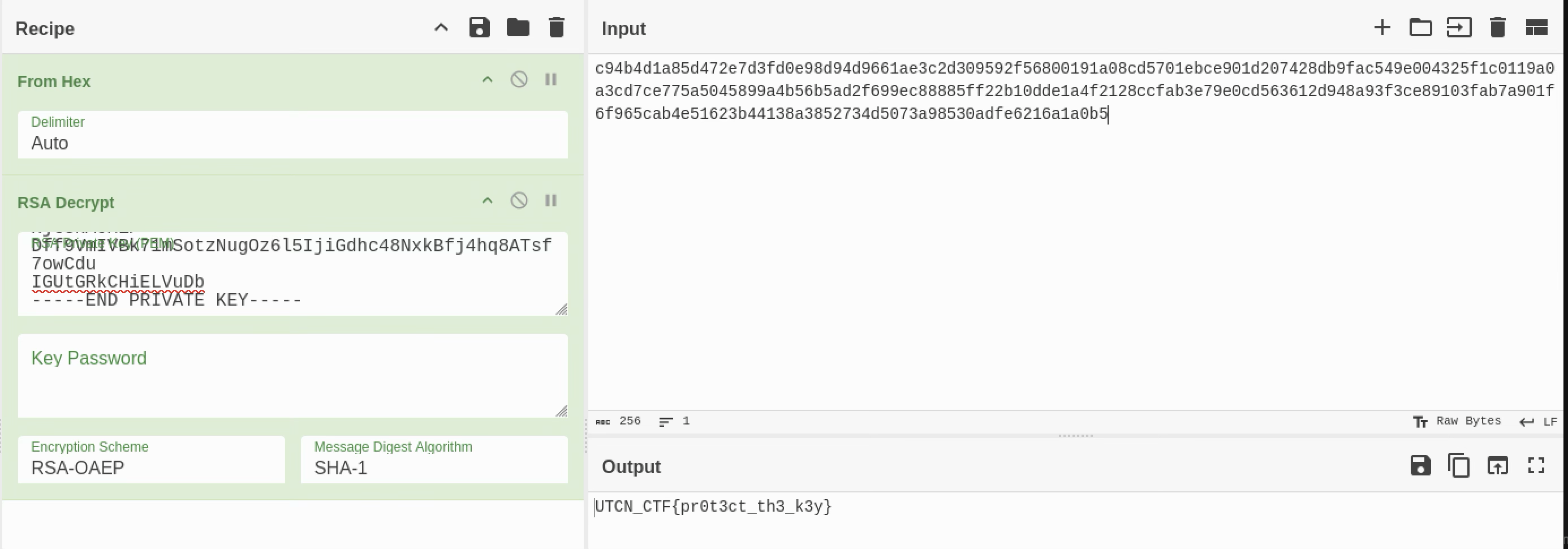
With the decrypted private key, I opened CyberChef and used the RSA Decrypt operation with key.pem on cipher.txt to reveal the flag:
Idle Agent 1 - Forensics
This is a very simple forensics challenge, in which we have a Windows crash dump. I resolved it very quickly by just using strings and grepping for the malicious executable, which is obvious:
1
2
3
4
5
6
7
8
9
10
11
12
13
14
15
16
17
18
┌──(m9suu㉿kali)-[~/Desktop/utcn/idle_agent1]
└─$ ls
MEMORY.DMP

┌──(m9suu㉿kali)-[~/Desktop/utcn/idle_agent1]
└─$ file MEMORY.DMP
MEMORY.DMP: MS Windows 64bit crash dump, version 15.7601, 4 processors, DumpType (0x1), 130942 pages

┌──(m9suu㉿kali)-[~/Desktop/utcn/idle_agent1]
└─$ strings MEMORY.DMP | grep ".exe"
.....
C:\Users\user\Desktop\utcn4g3nt.exe
utcn4g3nt.exe
utcn4g3nt.exe
utcn4g3nt.exe
utcn4g3nt.exe
utcn4g3nt.exe
.....
Professor Laptop - Forensics
I opened the professor_laptop folder and looked through all the files:
1
2
3
4
5
6
7
8
9
10
11
12
┌──(m9suu㉿kali)-[~/Desktop/utcn/professor_laptop]
└─$ ls -lah
total 36K
drwxrwxr-x 7 m9suu m9suu 4.0K Jun 19 03:40 .
drwxrwxr-x 4 m9suu m9suu 4.0K Jun 29 03:07 ..
-rw-rw-r-- 1 m9suu m9suu   30 Jun 19 03:40 .bash_history
-rw-rw-r-- 1 m9suu m9suu  231 Jun 19 03:39 .browser_history.txt
drwxrwxr-x 2 m9suu m9suu 4.0K Jun 19 03:39 Desktop
drwxrwxr-x 2 m9suu m9suu 4.0K Jun 19 03:39 Documents
drwxrwxr-x 2 m9suu m9suu 4.0K Jun 29 03:07 Downloads
drwxrwxr-x 3 m9suu m9suu 4.0K Jun 19 03:39 .local
drwxrwxr-x 2 m9suu m9suu 4.0K Jun 19 03:39 .ssh
At first I didn’t find anything important, until I checked .browser_history and realized it pointed to some deleted files. I found a file in the trash containing the flag, encoded in base64:
1
2
3
4
5
6
7
8
9
10
11
12
13
14
15
16
17
18
19
20
21
$ cd .local
$ ls
share

$ cd share
$ ls
Trash

$ cd Trash
$ ls
files  info

$ cd files
$ ls
deleted_notes.txt

$ cat deleted_notes.txt
Old private notes:

Final encoded note:
VVRDTl9DVEZ7ZDNsMzczZF9kMDM1X24wN19tMzRuX2cwbjN9
Weird Data - Misc
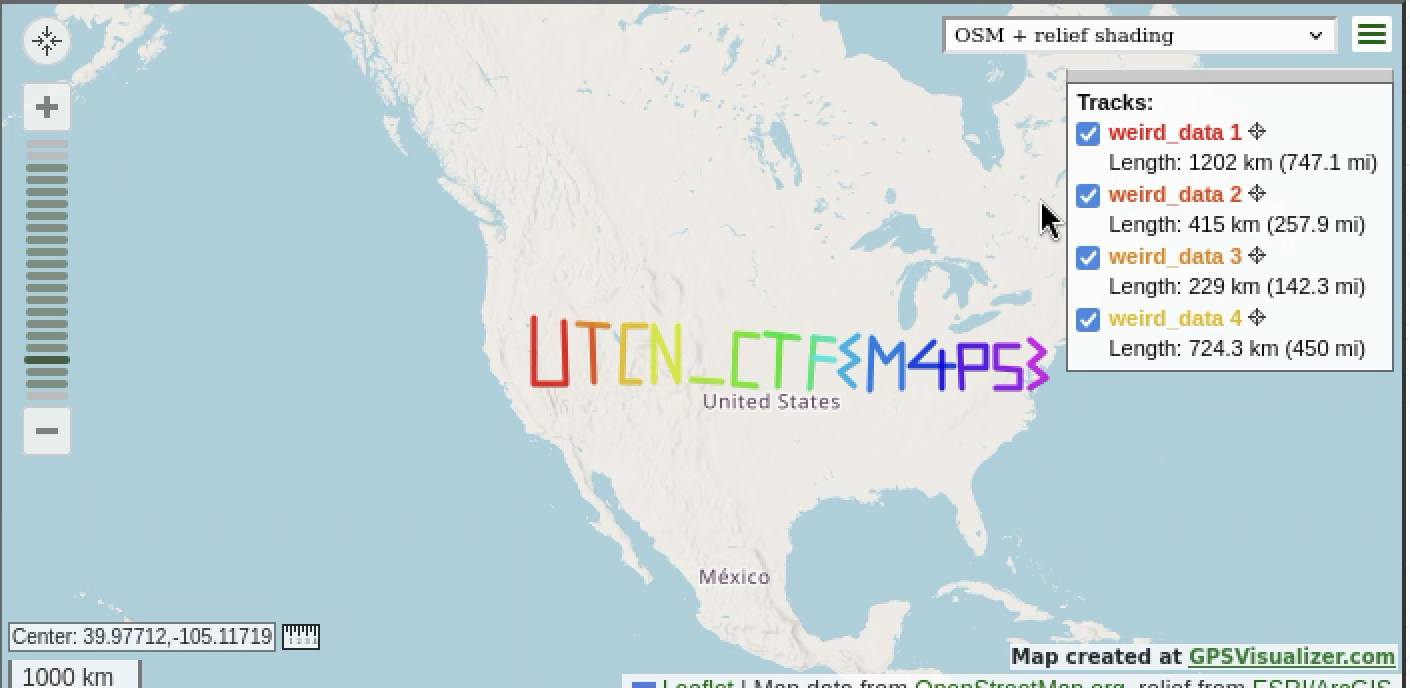
We have a .gpx file, which I uploaded to gpsvisualizer.com to plot the route defined by its coordinates. The resulting route is a graphical representation of the flag:
Broken University Logo - Misc
We have a PNG file, so the first thing I did was use exiftool to check all the metadata, where we can find the flag in a comment field:
1
2
3
4
5
6
7
8
9
┌──(m9suu㉿kali)-[~/Desktop/utcn]
└─$ exiftool utcn.png
ExifTool Version Number         : 13.50
File Name                       : utcn.png
Directory                       : .
File Size                       : 119 kB
.......
Comment                         : 'UTCN_CTF{c0mpr3553d_m374d474_b3475_57r1ng5}'
....